
Download OpenRGB full version program free setup for Windows. It is an open-source RGB lighting control software that eliminates the need for proprietary manufacturer software. It offers a unified interface for managing RGB lighting across various hardware brands, making it easier for users to achieve synchronized lighting effects.
OpenRGB Overview
OpenRGB is an open-source software application designed to provide cross-platform control and monitoring of RGB lighting devices and components. Aimed at enthusiasts, gamers, and system builders, OpenRGB offers a unified solution for managing RGB lighting effects across various hardware brands and models. It supports a wide range of devices, including motherboard RGB controllers, RAM modules, RGB LED strips, fans, keyboards, mice, and other peripherals that utilize RGB lighting.
At its core, OpenRGB simplifies the management of RGB lighting by providing a single interface to control multiple devices. This eliminates the need for proprietary software from individual hardware manufacturers, offering users greater flexibility and compatibility across different brands. Whether users have components from ASUS, MSI, Gigabyte, Corsair, or others, OpenRGB aims to provide seamless integration and control.
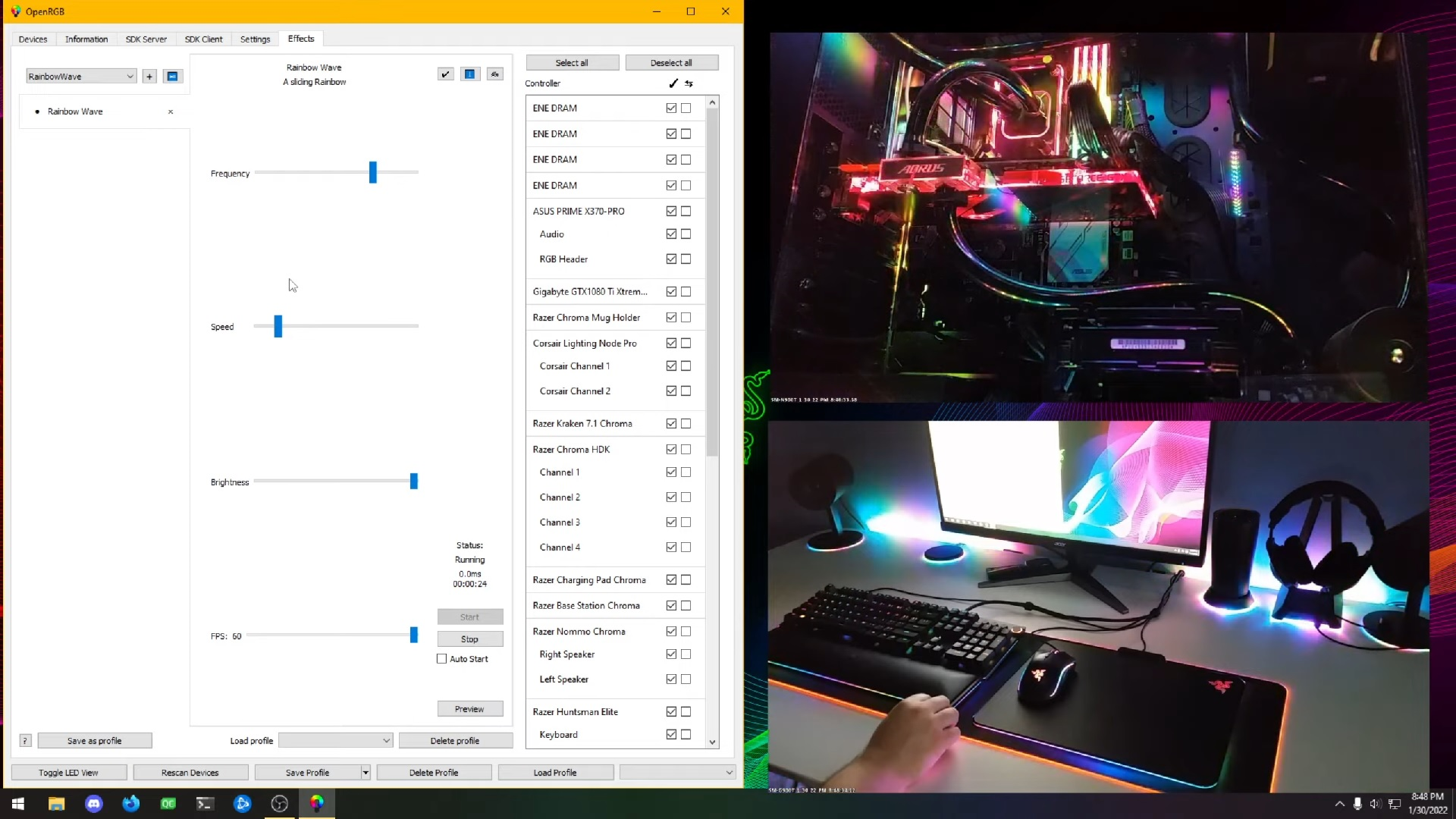
The software supports a variety of functionalities essential for RGB customization. Users can adjust color schemes, lighting patterns, and effects across connected devices, enabling them to synchronize lighting themes or create unique configurations tailored to their preferences. This customization extends to features like brightness control, speed adjustment, and custom animations, allowing for intricate and personalized lighting setups.
One of OpenRGB’s strengths lies in its open-source nature, which encourages community contributions and ensures ongoing development and compatibility with new hardware releases. This transparency also fosters trust among users concerned about privacy and software security, as the source code is openly available for review and modification.
OpenRGB is designed to be user-friendly, with an intuitive interface that facilitates easy navigation and configuration. It supports real-time monitoring of RGB device status and performance metrics, providing insights into temperature, fan speed, and other relevant data alongside RGB controls. This monitoring capability enhances overall system management and ensures optimal performance while maintaining aesthetic preferences.
For enthusiasts and modders, OpenRGB offers advanced features such as scripting support and API integration, allowing for automation and integration with other software and hardware systems. This flexibility makes OpenRGB not only a tool for RGB lighting control but also a platform for creative and technical experimentation within the gaming and PC enthusiast communities.
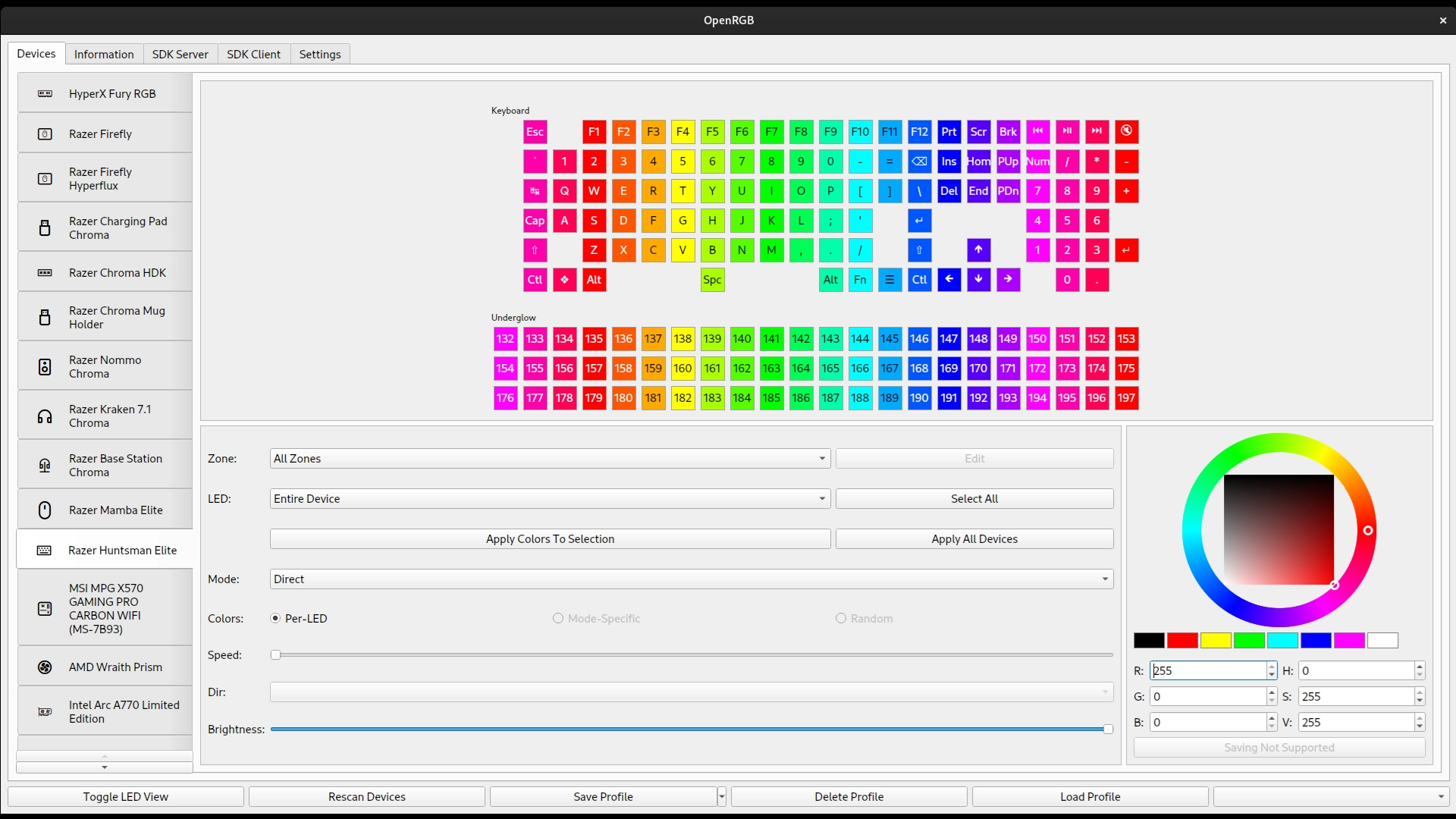
In summary, OpenRGB stands out as a versatile and community-driven solution for managing RGB lighting across a diverse range of hardware components. Its emphasis on compatibility, customization, open-source transparency, and user-friendliness makes it an attractive choice for users looking to unify and enhance their RGB lighting experience without being tied to proprietary software ecosystems.
Features
- Cross-Platform Compatibility: Supports Windows, Linux, and macOS operating systems.
- Unified RGB Control: Manages RGB lighting effects across multiple hardware brands and models.
- Motherboard RGB Support: Controls RGB lighting integrated into motherboards from various manufacturers.
- Peripheral Device Support: Compatible with RGB lighting on keyboards, mice, headsets, and other peripherals.
- RAM Module Compatibility: Supports RGB lighting customization on RAM modules from different vendors.
- Fan and Cooler Control: Manages RGB lighting effects on fans, CPU coolers, and case fans.
- GPU RGB Control: Allows customization of RGB lighting on supported graphics cards.
- LED Strip Management: Controls RGB LED strips and lighting kits connected to the system.
- Advanced Lighting Effects: Offers a variety of lighting patterns, colors, and effects for customization.
- Synchronization: Synchronizes RGB lighting across all connected devices for uniform lighting themes.
- Brightness and Speed Adjustment: Controls brightness levels and speed of RGB lighting effects.
- Custom Color Profiles: Allows creation and management of custom color profiles and themes.
- Real-Time Monitoring: Monitors RGB device status and performance metrics in real-time.
- Temperature Monitoring: Displays temperature readings alongside RGB controls for hardware monitoring.
- Fan Speed Monitoring: Tracks fan speeds and allows adjustment through the interface.
- Scripting Support: Enables scripting for automation and advanced customization of RGB lighting effects.
- API Integration: Integrates with other software and hardware systems via APIs for enhanced functionality.
- Open-Source: Source code available for transparency, community contributions, and customization.
- User-Friendly Interface: Intuitive UI for easy navigation and configuration of RGB settings.
- Profile Management: Saves and loads different RGB profiles for quick switching between configurations.
- Game Integration: Syncs RGB lighting effects with supported games for immersive gaming experiences.
- Keyboard Shortcut Support: Offers keyboard shortcuts for quick access to RGB controls and profiles.
- Color Wheel and Palette: Provides color wheel and palette tools for precise color selection.
- Backup and Restore: Allows backup and restoration of RGB profiles and settings.
- Privacy and Security: Ensures user data privacy and security with open-source transparency.
- Community-driven Development: Benefits from community feedback and ongoing feature enhancements.
- Low Resource Usage: Minimal impact on system performance and resources during operation.
- Multi-language Support: Available in multiple languages for global accessibility and usability.
- Efficient Updates: Regular updates with new features, bug fixes, and hardware compatibility improvements.
- Customizable Themes: Allows customization of the software’s appearance and interface themes.
Technical Details
- Software Name: OpenRGB for Windows
- Software File Name: OpenRGB-1.0.rar
- Software Version: 1.0
- File Size: 8.66 MB
- Developers: OpenRGB
- File Password: 123
- Language: Multilingual
- Working Mode: Offline (You donÆt need an internet connection to use it after installing)
System Requirements
- Operating System: Win 7, 8, 10, 11
- Free Hard Disk Space:
- Installed Memory: 1 GB
- Processor: Intel Dual Core processor or later
- Minimum Screen Resolution: 800 x 600
What is the latest version of OpenRGB?
The developers consistently update the project. You can view the most recent software update on their official website.
Is it worth it to install and use Software OpenRGB?
Whether an app is worth using or not depends on several factors, such as its functionality, features, ease of use, reliability, and value for money.
To determine if an app is worth using, you should consider the following:
- Functionality and features: Does the app provide the features and functionality you need? Does it offer any additional features that you would find useful?
- Ease of use: Is the app user-friendly and easy to navigate? Can you easily find the features you need without getting lost in the interface?
- Reliability and performance: Does the app work reliably and consistently? Does it crash or freeze frequently? Does it run smoothly and efficiently?
- Reviews and ratings: Check out reviews and ratings from other users to see what their experiences have been like with the app.
Based on these factors, you can decide if an app is worth using or not. If the app meets your needs, is user-friendly, works reliably, and offers good value for money and time, then it may be worth using.
Is OpenRGB Safe?
OpenRGB is widely used on Windows operating systems. In terms of safety, it is generally considered to be a safe and reliable software program. However, it’s important to download it from a reputable source, such as the official website or a trusted download site, to ensure that you are getting a genuine version of the software. There have been instances where attackers have used fake or modified versions of software to distribute malware, so it’s essential to be vigilant and cautious when downloading and installing the software. Overall, this software can be considered a safe and useful tool as long as it is used responsibly and obtained from a reputable source.
How to install software from the WinRAR file?
To install an application that is in a WinRAR archive, follow these steps:
- Extract the contents of the WinRAR archive to a folder on your computer. To do this, right-click on the archive and select ”Extract Here” or ”Extract to [folder name]”.”
- Once the contents have been extracted, navigate to the folder where the files were extracted.
- Look for an executable file with a .exeextension. This file is typically the installer for the application.
- Double-click on the executable file to start the installation process. Follow the prompts to complete the installation.
- After the installation is complete, you can launch the application from the Start menu or by double-clicking on the desktop shortcut, if one was created during the installation.
If you encounter any issues during the installation process, such as missing files or compatibility issues, refer to the documentation or support resources for the application for assistance.
Can x86 run on x64?
Yes, x86 programs can run on an x64 system. Most modern x64 systems come with a feature called Windows-on-Windows 64-bit (WoW64), which allows 32-bit (x86) applications to run on 64-bit (x64) versions of Windows.
When you run an x86 program on an x64 system, WoW64 translates the program’s instructions into the appropriate format for the x64 system. This allows the x86 program to run without any issues on the x64 system.
However, it’s important to note that running x86 programs on an x64 system may not be as efficient as running native x64 programs. This is because WoW64 needs to do additional work to translate the program’s instructions, which can result in slower performance. Additionally, some x86 programs may not work properly on an x64 system due to compatibility issues.
What is the verdict?
This app is well-designed and easy to use, with a range of useful features. It performs well and is compatible with most devices. However, may be some room for improvement in terms of security and privacy. Overall, it’s a good choice for those looking for a reliable and functional app.
Download OpenRGB Latest Version Free
Click on the button given below to download OpenRGB free setup. It is a complete offline setup for Windows and has excellent compatibility with x86 and x64 architectures.
File Password: 123
TOP ALTERNATIVES
 Adobe Photoshop 7 Free Download
 Adobe Flash Pro CC 2015 Free Download
 AutoDesk 3D Maya 2016 Free Download
 Adobe Illustrator CC 2015 Free Download
 CorelDraw Graphic Suite X7 Free Download
 ScreenToGif 2.43.2
 FastStone Photo Resizer 4.5 Corporate
 Unity 3D 5.2.4 Free Download
 Adobe Illustrator CC 2014 Free Download
 Jeta Logo Designer 2.5