
Download Heidi Eraser 6 full version program free setup for Windows. This program is an advanced security tool for Windows that allows you to remove sensitive data from your hard drive by overwriting it several times with carefully selected patterns.
Heidi Eraser Overview
Heidi Eraser is a powerful data erasure software designed to securely delete files and folders from storage devices. It is widely recognized for its robust features that ensure sensitive information is permanently removed, making it ideal for individuals, businesses, and organizations concerned with data privacy and security. The software operates by overwriting the contents of files multiple times using advanced algorithms approved by government agencies and security organizations. This process ensures that deleted data cannot be recovered using conventional file recovery tools, effectively preventing unauthorized access or data breaches.
One of the standout features of Heidi Eraser is its user-friendly interface, which makes it accessible to both novice users and IT professionals alike. The interface guides users through the process of selecting files or folders for deletion and allows them to choose from various erasure methods based on their security needs. These methods include Gutmann, DoD 5220.22-M, and others, each offering different levels of overwrite patterns to meet specific security standards.
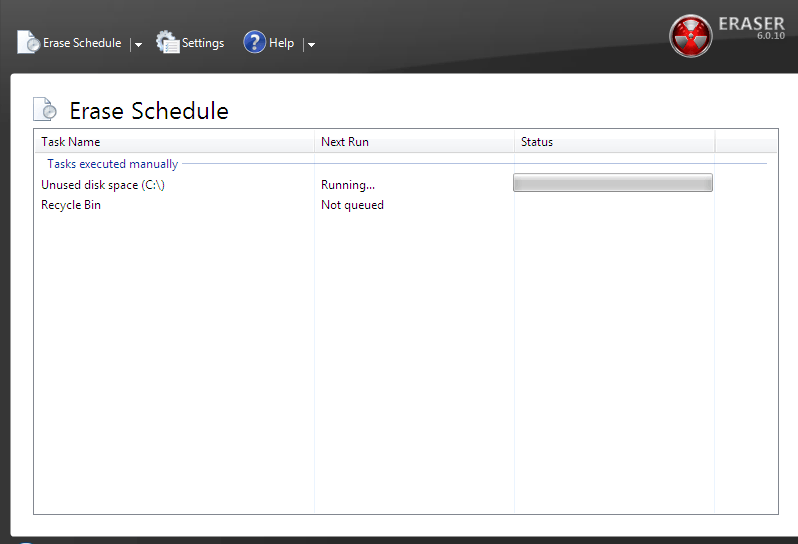
Heidi Eraser supports multiple erasure methods to accommodate different data sanitization requirements. For instance, the Gutmann method performs 35 passes over the data, ensuring comprehensive overwrite, while the DoD 5220.22-M method adheres to the U.S. Department of Defense standards with its three-pass overwrite approach. These methods cater to varying levels of sensitivity and regulatory compliance, providing flexibility for users in different industries.
The software integrates seamlessly with Windows Explorer, allowing users to right-click on files or folders to securely erase them directly from the context menu. This integration simplifies the workflow and enhances productivity by eliminating the need to open the software separately for each deletion task. Moreover, Heidi Eraser supports the erasure of unused disk space on storage devices, ensuring that previously deleted files are unrecoverable, thus maintaining overall data security.
Another key feature of Heidi Eraser is its customization options. Users can configure settings such as the number of passes for erasure, scheduling erasure tasks at specific times, and generating detailed erasure reports for auditing purposes. These customization capabilities enable organizations to implement tailored data erasure policies that align with their security protocols and compliance requirements.
Furthermore, Heidi Eraser is compatible with a wide range of storage devices, including hard drives, solid-state drives (SSDs), USB drives, and memory cards. It supports all major Windows operating systems and provides regular updates to ensure compatibility with new hardware and software developments. Additionally, the software offers technical support to assist users with implementation, troubleshooting, and maximizing the effectiveness of data erasure practices.
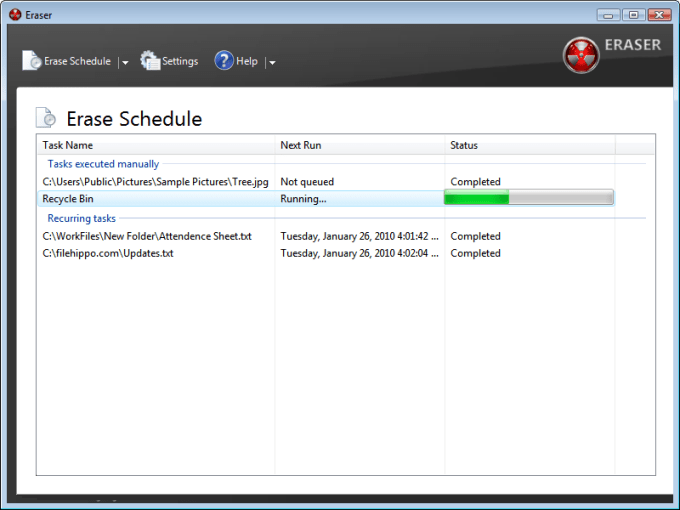
In summary, Heidi Eraser stands out as a comprehensive solution for securely deleting sensitive data from various storage devices. Its combination of advanced erasure methods, user-friendly interface, integration with Windows Explorer, customization options, and broad device compatibility makes it a trusted tool for safeguarding data privacy and complying with regulatory requirements. Whether used by individuals or large enterprises, Heidi Eraser ensures that deleted data remains unrecoverable, mitigating the risks associated with data breaches and unauthorized access.
Features
- Secure Data Erasure: Permanently deletes files and folders to prevent recovery.
- Advanced Overwrite Algorithms: Uses advanced algorithms to overwrite data multiple times.
- Government-Approved Methods: Supports standards like Gutmann and DoD 5220.22-M for data sanitization.
- User-Friendly Interface: Intuitive interface suitable for both novice and advanced users.
- Windows Explorer Integration: Right-click context menu integration for easy file/folder erasure.
- Multiple Erasure Methods: Offers various overwrite patterns to meet different security requirements.
- Gutmann Method: Performs 35 passes over data for thorough erasure.
- DoD 5220.22-M Method: Adheres to U.S. Department of Defense standards with three-pass overwrite.
- Unused Disk Space Erasure: Erases previously deleted data to prevent recovery.
- Customizable Settings: Allows configuration of erasure settings and number of passes.
- Scheduled Erasure: Enables scheduling of erasure tasks at specified times.
- Detailed Erasure Reports: Generates reports for auditing and compliance purposes.
- Compatibility: Works with hard drives, SSDs, USB drives, and memory cards.
- Windows OS Support: Compatible with all major versions of Windows operating systems.
- Regular Updates: Ensures compatibility with new hardware and software updates.
- Data Sanitization: Ensures compliance with data privacy regulations and standards.
- File/Folder Selection: Allows selection of individual files or entire folders for erasure.
- Customizable Erasure Methods: Users can define custom erasure patterns.
- Integration with File Explorer: Streamlines workflow with direct erasure from Windows Explorer.
- Batch Erasure: Supports erasure of multiple files or folders in one operation.
- Quick Erase: Provides a fast option for securely deleting files without multiple passes.
- Verification Options: Offers verification mechanisms to ensure successful erasure.
- Disk Wiping: Erases entire disks or partitions securely.
- Portable Version: Some versions offer a portable option for use without installation.
- Technical Support: Provides assistance for implementation and troubleshooting.
- Comprehensive Documentation: Offers detailed user manuals and guides.
- Automation: Supports automation of erasure tasks through scripting or scheduled tasks.
- Encryption Key Erasure: Securely deletes encryption keys to prevent unauthorized access.
- Sector-Level Erasure: Erases data at the sector level to ensure complete removal.
Technical Details
- Software Name: Heidi Eraser for Windows
- Software File Name: Heidi-Eraser-6.2.0.2994.rar
- Software Version: 6.2.0.2994
- File Size: 8.36 MB
- Developers: Heidi Computers Limited
- File Password: 123
- Language: Multilingual
- Working Mode: Offline (You donÆt need an internet connection to use it after installing)
System Requirements
- Operating System: Win 7, 8, 10, 11
- Free Hard Disk Space:
- Installed Memory: 1 GB
- Processor: Intel Dual Core processor or later
- Minimum Screen Resolution: 800 x 600
What is the latest version of Heidi Eraser?
The developers consistently update the project. You can view the most recent software update on their official website.
Is it worth it to install and use Software Heidi Eraser?
Whether an app is worth using or not depends on several factors, such as its functionality, features, ease of use, reliability, and value for money.
To determine if an app is worth using, you should consider the following:
- Functionality and features: Does the app provide the features and functionality you need? Does it offer any additional features that you would find useful?
- Ease of use: Is the app user-friendly and easy to navigate? Can you easily find the features you need without getting lost in the interface?
- Reliability and performance: Does the app work reliably and consistently? Does it crash or freeze frequently? Does it run smoothly and efficiently?
- Reviews and ratings: Check out reviews and ratings from other users to see what their experiences have been like with the app.
Based on these factors, you can decide if an app is worth using or not. If the app meets your needs, is user-friendly, works reliably, and offers good value for money and time, then it may be worth using.
Is Heidi Eraser Safe?
Heidi Eraser is widely used on Windows operating systems. In terms of safety, it is generally considered to be a safe and reliable software program. However, it’s important to download it from a reputable source, such as the official website or a trusted download site, to ensure that you are getting a genuine version of the software. There have been instances where attackers have used fake or modified versions of software to distribute malware, so it’s essential to be vigilant and cautious when downloading and installing the software. Overall, this software can be considered a safe and useful tool as long as it is used responsibly and obtained from a reputable source.
How to install software from the WinRAR file?
To install an application that is in a WinRAR archive, follow these steps:
- Extract the contents of the WinRAR archive to a folder on your computer. To do this, right-click on the archive and select ”Extract Here” or ”Extract to [folder name]”.”
- Once the contents have been extracted, navigate to the folder where the files were extracted.
- Look for an executable file with a .exeextension. This file is typically the installer for the application.
- Double-click on the executable file to start the installation process. Follow the prompts to complete the installation.
- After the installation is complete, you can launch the application from the Start menu or by double-clicking on the desktop shortcut, if one was created during the installation.
If you encounter any issues during the installation process, such as missing files or compatibility issues, refer to the documentation or support resources for the application for assistance.
Can x86 run on x64?
Yes, x86 programs can run on an x64 system. Most modern x64 systems come with a feature called Windows-on-Windows 64-bit (WoW64), which allows 32-bit (x86) applications to run on 64-bit (x64) versions of Windows.
When you run an x86 program on an x64 system, WoW64 translates the program’s instructions into the appropriate format for the x64 system. This allows the x86 program to run without any issues on the x64 system.
However, it’s important to note that running x86 programs on an x64 system may not be as efficient as running native x64 programs. This is because WoW64 needs to do additional work to translate the program’s instructions, which can result in slower performance. Additionally, some x86 programs may not work properly on an x64 system due to compatibility issues.
What is the verdict?
This app is well-designed and easy to use, with a range of useful features. It performs well and is compatible with most devices. However, may be some room for improvement in terms of security and privacy. Overall, it’s a good choice for those looking for a reliable and functional app.
Download Heidi Eraser 6 Latest Version Free
Click on the button given below to download Heidi Eraser free setup. It is a complete offline setup for Windows and has excellent compatibility with x86 and x64 architectures.
TOP ALTERNATIVES
 Bitdefender Antivirus Plus 2023
 Quick Heal Antivirus Pro 17 Free Download
 Smadav Pro 2026 v15.8.2
 iSumsoft USBCode 3 Free Download
 AXshield Free Download
 Renee USB Block 2022 Free Download
 WebBrowserPassView 2.18
 Any Folder Password Lock 10.8.0.0
 TunesBro Folder Unbreak 11.5.0
 Elcomsoft Internet Password Breaker 3.30.5802