Download LosslessCut full version program the free setup for macOS.
LosslessCut Overview
LosslessCut is a cutting-edge video editing software that provides users with a seamless editing experience. Developed to preserve video quality, LossLessCut ensures that your edited videos retain the same quality as the original files. Its intuitive interface and efficient processing make it a top choice for professionals and beginners.
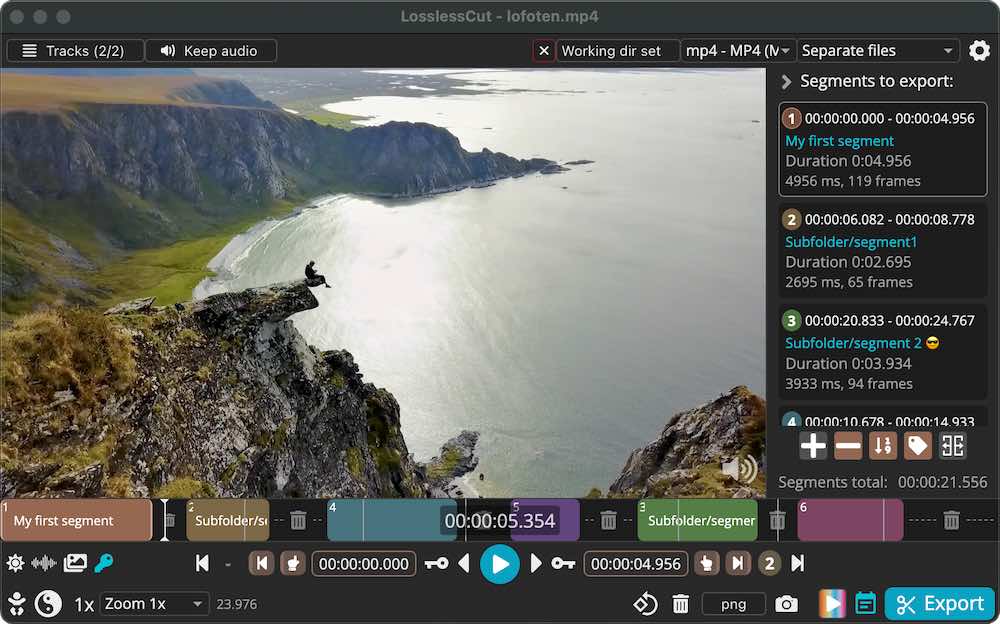
Features
- Lossless cutting of most video and audio formats
- Smart cut (experimental)
- Losslessly cut out parts of video/audio (for cutting away commercials etc.)
- Losslessly rearrange the order of video/audio segments
- Lossless merge/concatenation of arbitrary files (with identical codecs parameters, e.g., from the same camera)
- Lossless stream editing
- Combine arbitrary tracks from multiple files (ex., add music or subtitle track to a video file)
- Remove unneeded tracks
- Replace or re-encode only some tracks
- Extract all tracks from a file (extract video, audio, subtitle, attachments, and other tracks from one file into separate files)
- Fast multi-file workflow (note: no mass/batch export yet)
- Keyboard shortcut workflow
- Losslessly remix video/audio into a different container (file) format
- Take full-resolution snapshots from videos in JPEG/PNG format (low or high quality)
- Export ranges of video frames to images (every nth frame, second, by scene change, best thumbnails)
- Export only from a selected time range (segment)
- Optionally include original timestamps in image file names
- Manual input of cutpoint times
- Apply a per-file timecode offset (and auto load timecode from the file)
- Edit file metadata, per-track metadata, and per-track disposition
- Change rotation/orientation metadata in videos
- View technical data about all tracks
- Timeline zoom and frame/keyframe jumping for cutting around keyframes
- Video thumbnails and audio waveforms
- Saves per project cut segments to project file
- View FFmpeg’s last command log so you can modify and re-run recent commands on the command line.
- Undo/redo
- Give labels to cut segments
- Annotate segments with tags
- Import/export segments: MP4/MKV chapter marks, Text file, YouTube, CSV, CUE, XML (DaVinci, Final Cut Pro), and more
- MKV/MP4 embedded chapters marks editor
- View subtitles
- Customizable keyboard hotkeys
- Black scene detection, silent audio detection, and scene change detection
- Divide the timeline into segments with a length of L or N segments or even randomized segments!
Technical Details
- Software Name: LosslessCut
- Software File Name: .aztmwjxz2io3/LosslessCut-3.69.0.dmg
- Software Version: 3.69.0
- File Size: 160 MB
- Developers: Mikael Finstad
- Language: Multilingual
- Working Mode: Offline (You don’t need an internet connection to use it after installing)
System Requirements
- Operating System: macOS Sonoma 14.0 or later
- Processor: Apple Silicon (M1, M2, M3, M4) or Intel Core i5 or later
- RAM: 4 GB minimum, 8 GB recommended
- Storage: 150 MB free disk space
- Internet: Required for Structured Cloud sync and AI planning features
LosslessCut Free Download
Click on the button given below to download free setup. It is a complete offline setup for macOS.