
Creating fresh visual content every day is not easy. Whether you’re posting on YouTube, Instagram, TikTok, blogs, or running ads, the demand for eye-catching visuals never slows down. Most creators eventually hit a wall—creative burnout, repetitive design styles, and hours wasted trying to brainstorm something new.
That’s where modern AI tools are changing the game. An image-to-image AI solution helps transform existing visuals into completely new creative outputs in seconds. Creators can now reimagine their content using smart automation instead of starting from scratch.
Platforms like Media.io and its powerful image-to-image AI feature make it easier for designers and content creators to turn simple images into professional-level visuals without advanced editing skills.
In this article, you’ll explore how this approach is changing the way content is created and why more creators are using it to stay consistent and inspired.
Why Creative Burnout Is Becoming Common
Content creation has become a constant cycle. Every platform demands consistency, speed, and originality -all at the same time.
Here’s why creators are feeling stuck more than ever:
- Posting schedules are tighter than before
- Online content is oversaturated with similar styles
- Visual trends change rapidly
- Brainstorming time is often very limited
Because of this pressure, many creators struggle to:
- Come up with fresh design ideas
- Maintain visual consistency across platforms
- Produce engaging content regularly
The real issue isn’t lack of creativity, it’s creative fatigue. When you’re producing nonstop, your mind eventually runs out of fresh directions. That’s exactly where an AI image generator from an image becomes a practical support tool.
What Is an AI Image Generator From Image?
An image to image ai generator is a tool that transforms existing images into new AI-generated versions. Instead of generating visuals from text prompts alone, it uses your uploaded image as a base.
Simple Workflow:
Upload an image → choose a style → generate new visual variations.
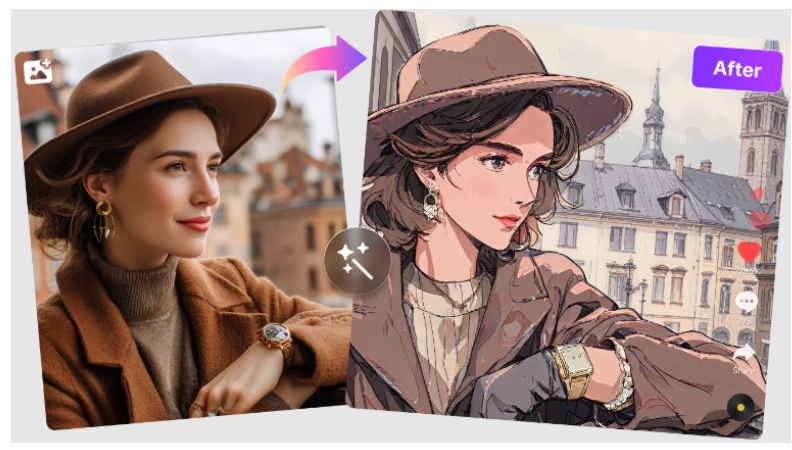
Key capabilities include:
- Image restyling and transformation
- AI-based artistic conversion
- Cinematic visual effects
- Enhanced lighting and composition
- Multiple creative variations from a single image
Popular tools like Media.io Image to Image AI offer a much faster and easier way to experiment with creative ideas.
It stands out because it offers:
- Beginner-friendly
- Browser-based (no software installation)
- Fast in generating results
- Flexible with multiple visual styles
- Useful for both creators and marketers
Even a basic photo can be turned into a professional-looking creative in seconds.
How Creators Use AI Image Tools for Fresh Content Ideas
AI-powered image tools are no longer just simple editing assistants. They’re becoming creative support systems that help creators explore fresh visual ideas faster, experiment with different styles, and produce engaging content without starting every design from scratch. They assist creators to:
Transforming Ordinary Photos Into Viral Social Media Content
A simple selfie, travel photo, or product image can quickly be transformed into:
- trendy aesthetic visuals
- stylized portraits
- cinematic edits
- eye-catching social media posts
This allows creators to keep up with fast-changing visual trends while saving hours of manual editing. Instead of redesigning content repeatedly, they can generate fresh-looking visuals from existing images in just a few clicks.
Generating Multiple Design Concepts From One Image
One of the biggest advantages of using an image to image ai generator is creative flexibility. A single uploaded image can be turned into multiple content formats, including:
- YouTube thumbnails
- ad banners
- posters
- social media creatives
- profile visuals
This makes content experimentation much easier. Rather than creating every design separately, creators and marketers can instantly test different visual directions and choose the strongest concept for their audience.
Improving YouTube Thumbnail Creativity
YouTube thumbnails often determine whether viewers click or continue scrolling. Using an AI image generator from an image-free tool allows creators to experiment with:
- dramatic lighting effects
- cinematic color grading
- bold visual enhancements
- high-contrast storytelling styles
These AI-generated variations help thumbnails stand out in crowded feeds while reducing the time spent in complicated editing software.
Helping Small Businesses Create Better Marketing Visuals
Many small businesses and online sellers don’t have access to professional design teams. AI image tools help simplify content creation by generating:
- product promotion visuals
- branded social media posts
- ad creatives
- campaign graphics
- marketing variations
With just one product image, businesses can quickly create multiple professional-looking visuals for promotions, seasonal campaigns, and online ads without needing advanced design skills.
How to Use Media.io Image to Image AI to Create Better Content Ideas
Creating fresh visual concepts with Media.io image-to-image AI is surprisingly simple and doesn’t require advanced editing experience. The platform is designed for quick experimentation, allowing creators to turn ordinary images into new creative styles within minutes.
Here is a simple step-by-step workflow:
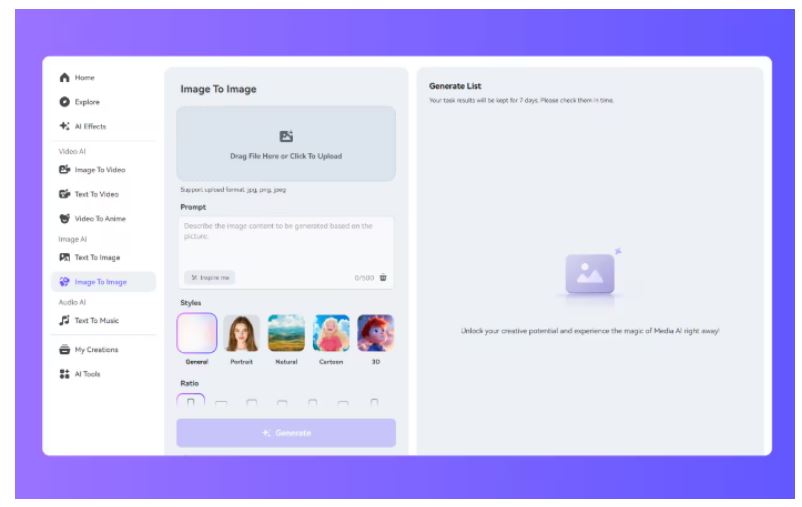
Step 1: Upload Image
Go to your browser and open the Media.io Image to Image AI tool. And upload the image you want to transform. The tool supports common image formats such as JPG, PNG, WEBP, GIF, and HEIC. Use a high-quality image for better results.
Step 2: Choose AI Style
After uploading your image, select your preferred visual style. Media.io offers multiple creative options like Ghibli, Cartoon, and 3D visuals.
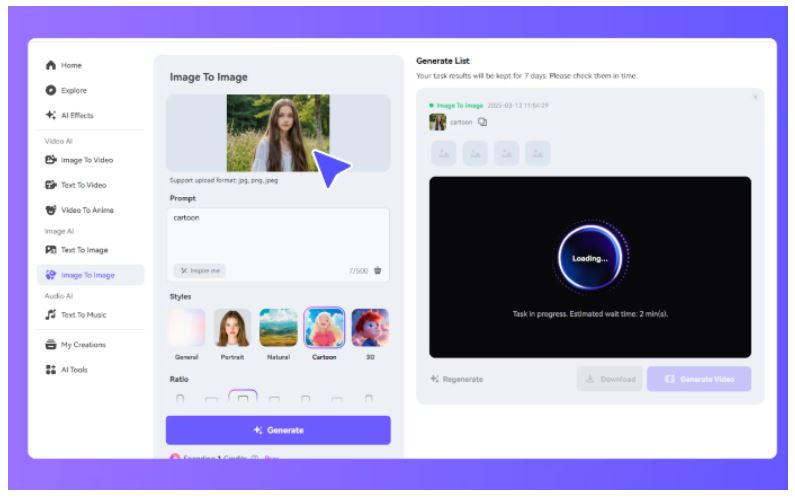
Step 3: Generate AI Image Variations
Once you’ve selected your style, simply click the “Generate” button and let the AI do the creative work for you. Within seconds, the tool will create multiple stylized versions of your image while still preserving the main details and overall look of the original photo.
Step 4: Preview & Download
When results are ready, preview the generated visuals carefully. If you feel satisfied, download the image. You can instantly use the downloaded image for social media posts, YouTube thumbnails, ads, or creative projects.
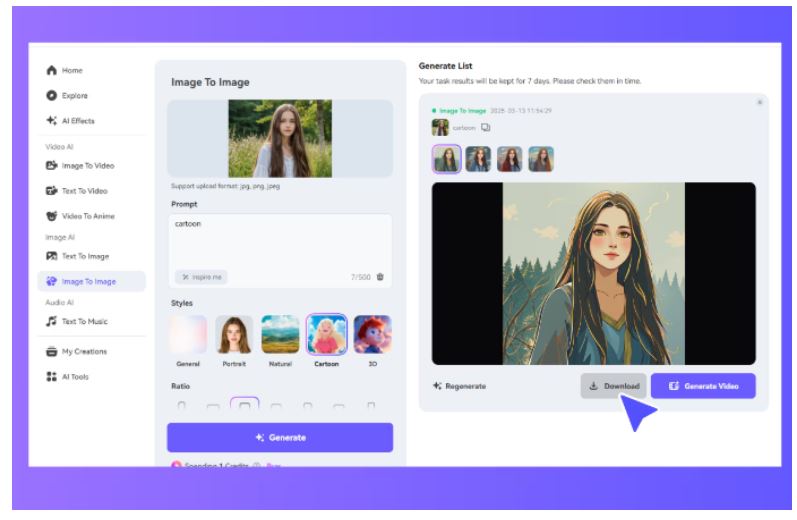
You can see that no installation is needed, and everything works directly in your browser. For users looking for a free image-to-image AI generator to try, Media.io’s browser-based workflow can be a convenient starting point.
Benefits of Using AI for Creative Inspiration
AI tools are becoming essential in modern content workflows because they:
- Save brainstorming time
- Reduce creative block
- Speed up content creation
- Offer instant design inspiration
- Help beginners create professional visuals
The goal isn’t to replace creativity but to enhance it. AI simply allows creators to explore more ideas in less time and with less effort.
Things to Keep in Mind When Using AI Image Tools
AI tools are powerful. But they still require thoughtful use:
- Not every output will match your expectations
- Some styles need experimentation
- Image quality affects final results
- Over-editing can make visuals look unnatural
The best results come from testing different styles and refining what works best. Tools like Media.io Image to Image AI make this process easier by offering multiple variations quickly. That helps creators refine ideas without wasting time.
Conclusion
Burnout is becoming a common issue among creators who are trying to meet the demands of content on various platforms regularly. That’s why AI image tools are so beneficial. They enable the creation of new visual ideas more quickly, streamline creative experimentation, speed up content flow, and minimize repetitive design efforts.
When you’re designing social media posts, thumbnails, or marketing images, tools such as Media.io can help you discover fresh ideas and new ways of creating without spending hours starting from scratch.
Don’t get stuck on creative burnout; give media.io image to image ai a try to get fresh ideas in your visuals, even faster.
FAQ
What is an AI image generator from an image?
It is a tool that can convert a given image into a new image created by AI, applying styles or artistic effects.
Can AI image tools help with creative blocks?
Yes, they are able to help you come up with new ideas fast by changing one image to create a number of other images for you to work with.
How do creators use AI image tools for social media?
They utilize them to craft fashionable posts, viral video clips, and captivating videos on sites for Instagram, TikTok, and YouTube.
Are AI-generated visuals useful for YouTube thumbnails?
Absolutely. They help create bold and cinematic thumbnails that improve click-through rates.
Can beginners use Media.io Image to Image AI easily?
Yes, it’s easy to use and has a simple upload and generate workflow.
TOP ALTERNATIVES
 Crafting the Ideal Online Shopping Journey
 The Best Way to Recover WhatsApp Data on Android Without Rooting Your Phone
The Psychology of Computer Skills Testing: Boosting Confidence and Beyond
How to Buy Proxy with Credit Card: A Step-by-Step Guide
The Best Way to Recover WhatsApp Data on Android Without Rooting Your Phone
The Psychology of Computer Skills Testing: Boosting Confidence and Beyond
How to Buy Proxy with Credit Card: A Step-by-Step Guide
 From Samsung to iPhone: Transfer Your Photos in Minutes
 How to Transfer Apps from iPhone to Android
 How to Recover Lost Videos from Any Device (Even Corrupted Ones)
 The Ultimate Guide to Mac Data Recovery: Get Your Files Back on macOS
 FRP as a Double-Edged Sword: The Lockout Epidemic
 How to Remove iCloud Activation Lock the Right Way (Official Apple Methods)