
Introduction
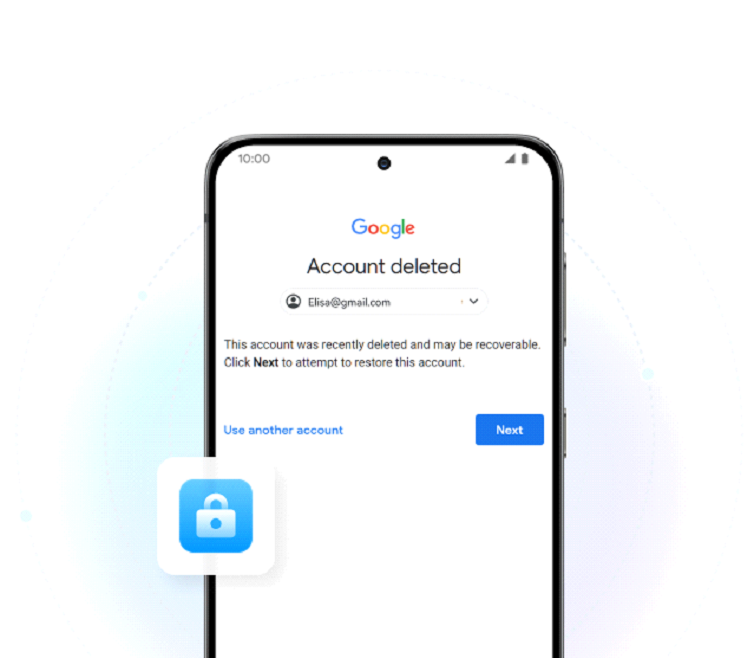
Getting stuck at the “Verify your account” page right after you reset your phone is a very annoying experience. This is a result of Factory Reset Protection (FRP), an anti-theft measure by Google that asks for the last Google account used on the phone after the reset.
FRP is designed to protect devices from thieves. Still, unfortunately, it has led to an increase in lockout situations for genuine users who have lost their account information, bought a used phone, or simply have done an incorrect reset. In this article, we describe how FRP has turned into a double-edged sword, what the triggers of these lockouts are, and how users can get their phones working again, without trouble.
The Anatomy of the Lockout Epidemic
Users often find themselves locked out of their phones even though they are the rightful owners. A common scenario is when someone buys a second-hand phone from a marketplace or even a family member and is unaware that the previous Google account is still linked; once the device is reset, FRP is activated and access is blocked.
Another case often happens when people reset their phones to fix bugs or to make them faster but then forget that the FRP will require the original Google account.
Gift problem is another scenario, where a device passed from one person to another is still linked to the old account.
Altogether, these simple errors lead to a painful cycle where users spending hours attempting to unlock their phones, losing valuable data, and are sometimes left with a device that is practically “bricked, ” resulting in emotional stress and financial loss.
Why the “Official” Path Often Fails
The recovery wall:
Google’s account recovery process can be extremely difficult if you don’t have access to the original recovery email or phone number. Without those, the system often refuses to verify your identity, leaving you stuck with no way forward.
Manufacturer support gaps:
Most phone manufacturers are unwilling to assist with an FRP removal unless you can provide the original proof of purchase that matches the owner. A second-hand buyer almost never has this, which means officially support becomes a near impossibility.
The result:
Without any official practical solution, many dissatisfied but genuine users are resorting to risky methods on the Internet and unverified loopholes just because they have no other option.
The Solution Spectrum: From Risky APKs to Reliable Software
The Dangers of Free, Unofficial Methods:
A lot of frustrated users end up using ‘FRP Bypass APKs’ with lots of tutorials on YouTube promising instant solutions. These methods may seem straightforward, although they are far from safe. Besides exposing users to malware or spyware threats, users’ core system functions might even be compromised, or their devices might become unusable.
The Case for Trusted Tools:
Trusted software offers a safer middle ground where users can avoid downloading questionable content and, at the same time, have a genuine way to unlock the device. This significantly impacts the choice of Dr.Fone – Screen Unlock (Android) in the market as a leading, trusted solution.
Dr.Fone – Screen Unlock (Android)
Besides the traditional support for FRP bypass, Dr.Fone – Screen Unlock (Android) also presents users with the ability to remove Google account verification on a wide range of devices, including Samsung, Xiaomi, Redmi, OPPO, Realme, Vivo, Motorola, Huawei, OnePlus, Tecno, Infinix, and many more, due to its AI-based FRP bypass capability. It can:
⦁ Bypass Google account verification after factory reset
⦁ Remove FRP without needing the previous Google account
⦁ Support Samsung S26 series, Snapdragon devices, and Android 16 FRP bypass
⦁ Provide online FRP bypass options for Samsung
⦁ Work across over 30 brands and 2000+ Android models
⦁ Offer guided, step-by-step FRP removal workflow with no technical skills required
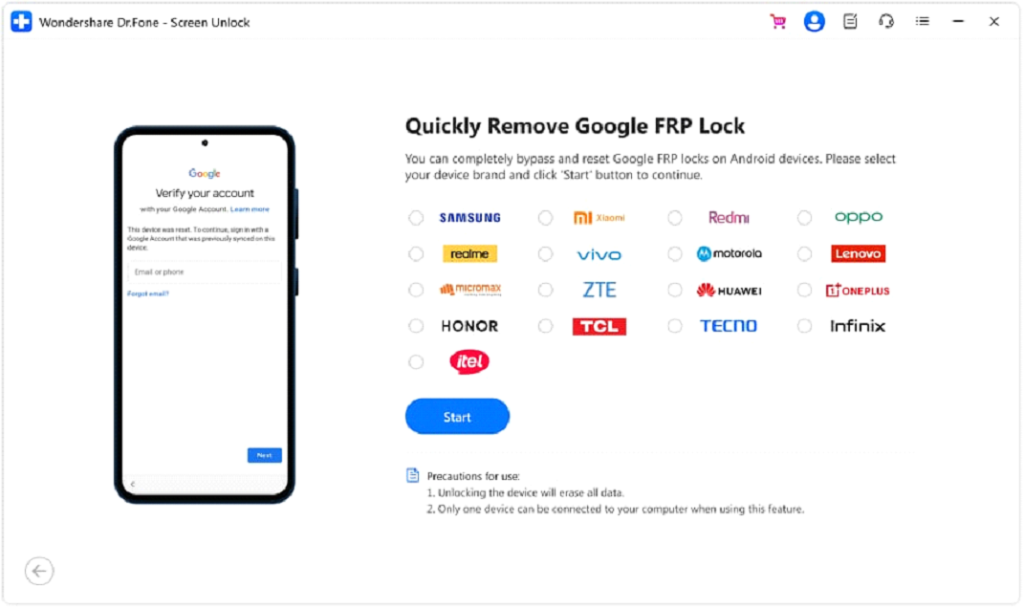
A Closer Look: How Professional FRP Removal Works
Professional FRP tools don’t depend on hacks or tricks. They provide a guided, legitimate set of steps for each device model and Android version, thus making the bypass safer and more reliable.
Different chipsets, like Samsung Snapdragon or MediaTek, need different treatments, and professional tools can change as they detect what is required. For those who want to follow the exact steps, Wondershare Dr.Fone provides detailed, device-specific instructions:
Some methods leading to bypass that include a factory reset can result in the loss of data. Therefore, these tools should only be used on one’s own devices to ensure a secure and responsible FRP unlock.
The Ethical Tightrope: Prevention Over Bypass
Best practices for users:
Always remove your Google account before performing a factory reset as this will prevent FRP lock if the phone is sold or given away. Prior to purchasing a second-hand device, ensure the previous owner removes their account and resets the phone in front of you to avoid any FRP lock issues later.
The right tool for the right reason:
FRP bypass software such as Dr.Fone is created as recovery aid for real owners who have lost access to their devices. Using them to gain unauthorized access is illegal and against the terms of service of the software as well as the local law.
Conclusion
FRP is indeed a very effective security feature but ironically it is also the cause of many genuine users getting locked out of their own devices. Having no official recovery option, users are forced to resort to risky methods thereby compromising their devices and data. Trusted software such as Dr.Fone – Screen Unlock (Android) provides users with a safer, more organized way however the best way out is to avoid the situation altogether, i.e. keep accounts updated, reset correctly and change hands with proper documentation. When FRP is used responsibly, it stays as a shield, not a weapon.
TOP ALTERNATIVES
 Transforming Clicks To Profits: 8 Strategies For Affiliate Marketing
 Impact of AI on Graphic Design – AI Thumbnail Maker
 Crafting the Ideal Online Shopping Journey
 The Best Way to Recover WhatsApp Data on Android Without Rooting Your Phone
The Psychology of Computer Skills Testing: Boosting Confidence and Beyond
How to Buy Proxy with Credit Card: A Step-by-Step Guide
The Best Way to Recover WhatsApp Data on Android Without Rooting Your Phone
The Psychology of Computer Skills Testing: Boosting Confidence and Beyond
How to Buy Proxy with Credit Card: A Step-by-Step Guide
 From Samsung to iPhone: Transfer Your Photos in Minutes
 How to Transfer Apps from iPhone to Android
 How to Recover Lost Videos from Any Device (Even Corrupted Ones)
 The Ultimate Guide to Mac Data Recovery: Get Your Files Back on macOS